Agency ad accounts, with the reporting built in
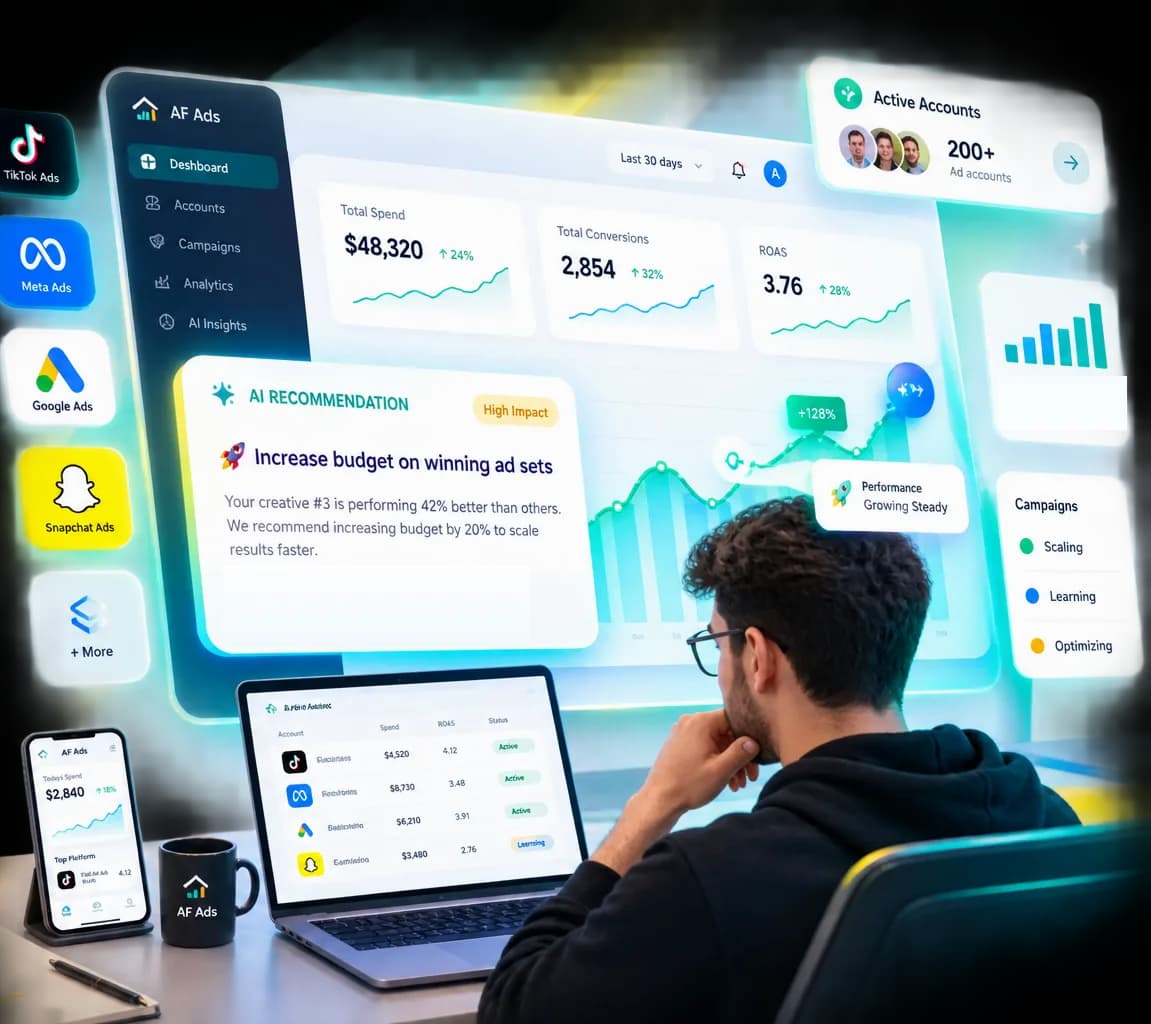
AF Ads supplies agency advertising accounts to media buyers, marketing agencies and e-commerce brands — and gives you a dashboard showing what every account and campaign is doing, what is left in it, and what the advertising really cost.
No payment required to apply. Every application is reviewed by a person.
Reviewed by a person
Every application is read by a human, not scored by a bot.
Reporting included
Campaign analytics come with the account, not as a second subscription.
Fees shown before you fund
The service fee is calculated and displayed on every top-up.
Your data stays yours
Each client sees only their own accounts and campaigns.
Platforms
Where we can open accounts
Availability is stated honestly, and it is read from what we can actually place you on rather than from a list somebody remembered to update. A platform marked coming soon is one we cannot supply today, and we would rather say so than take an application we cannot fulfil.
Not sure which you need, or new to this kind of account? What an agency ad account provider does explains the service, who it suits and how to choose between platforms.
Why AF Ads
Most providers sell you access. Then you are on your own.
Buying an agency ad account usually ends at the handover. Performance data stays inside each platform's own interface, spend reconciliation happens in a spreadsheet, and the total you actually paid only appears when somebody works it out by hand.
- One interface per platformAdvertising platforms use different reporting interfaces, attribution settings, metric definitions and conversion-tracking methods. AF Ads brings the available data into one consistent reporting view.
- Total cost is invisiblePlatform spend is not what the campaign cost you. Service and top-up fees sit outside the ad platform, so the complete figure never appears in the platform's own reporting.
- Reporting is normally a second subscriptionCross-platform dashboards are a separate product category, billed separately, connected to accounts they know nothing about.
- Nobody shows you how to use itAn account arrives with a login and no instructions. Setting up the pixel, structuring a campaign and reading the numbers afterwards are left for you to work out, usually from a search engine. Our packages include step-by-step video tutorials in the dashboard for exactly that.
Your dashboard
Every account, and what it is doing right now
Performance is half of it. The other half is knowing an account is live, funded and spending what you expected — which is the check most advertisers make far more often than they read a report.
Account status
Every account assigned to you with its current state and delivery status, so a stopped account is visible the same day rather than at the end of the month.
Balance tracking
Available balance on each account, with an estimated runway based on what it is currently spending.
Spend tracking
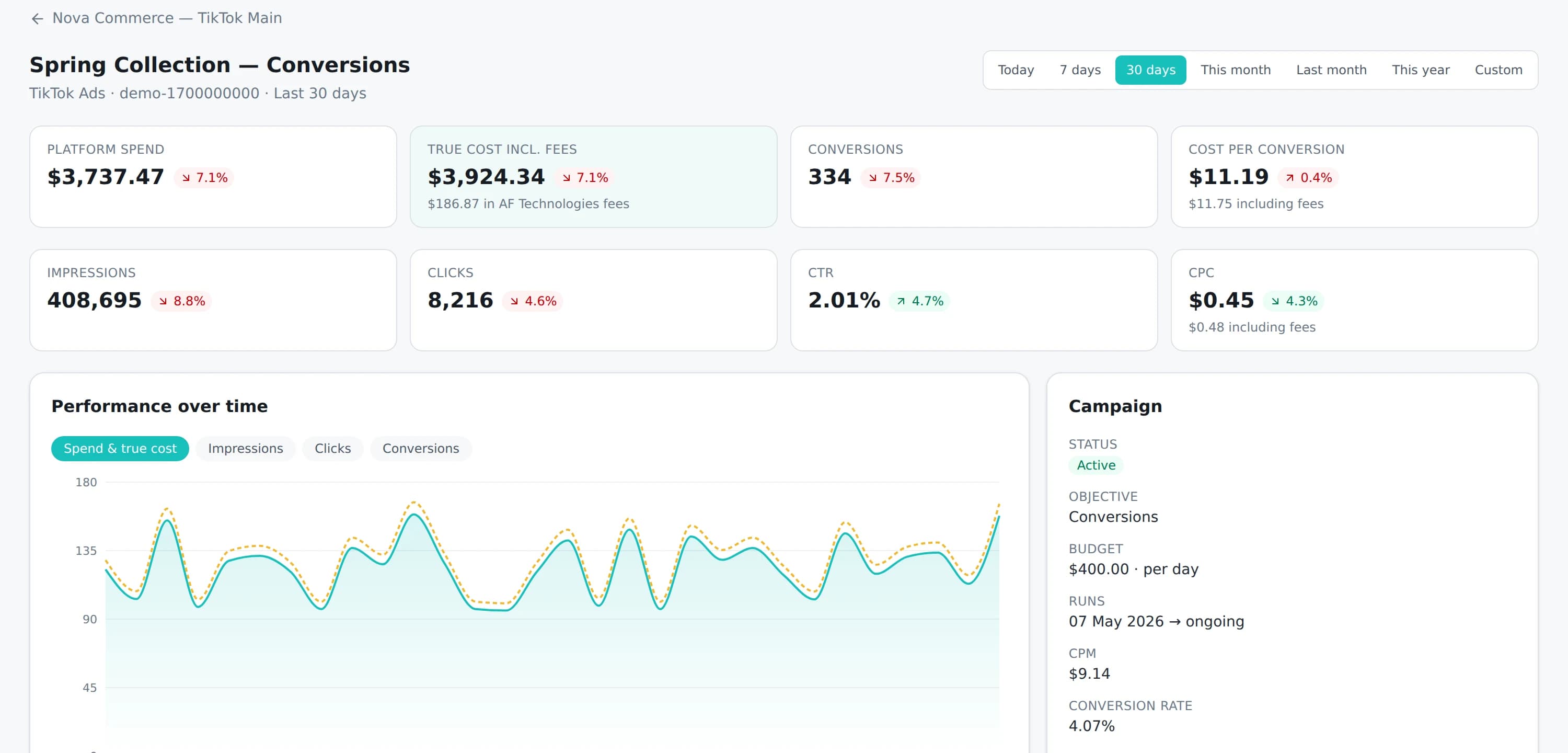
Platform spend and total advertising cost including the service fee, by account and by campaign, over any period you choose.
Funding history
Every top-up and every account funding on the record, written to an append-only ledger you can reconcile entry by entry.
It comes with every account and every package. See every metric the dashboard reports, or read how an account gets there in the first place.
Campaign analytics
See what every campaign is doing, without opening five tabs
Pick a platform, pick one of your assigned accounts, and drill from account performance down to a single ad — with the service fee included in every cost figure, so you are always looking at what the advertising really cost.
- 1Choose a platform and one of your assigned accounts
- 2See account-level spend, delivery status and remaining balance
- 3Open any campaign for its full metric breakdown, down to individual ads
- 4Compare any period against the one before it, then export
Metrics included
Spend · total cost including fees · impressions · reach · clicks · CTR · CPC · CPM · conversions · conversion rate · cost per conversion — each with its change against the previous period.
Which of these are available depends on what the advertising platform reports for your account. Where a platform does not report a figure, we show that it is missing rather than showing a zero.
AI recommendations
Available nowTurn campaign data into clearer decisions
Open any account or campaign and ask for a review of the period on screen. The analyst reads the figures already calculated there and tells you what needs attention, why it matters and what to do about it — naming the metrics behind every recommendation. On a video ad it goes further and examines the creative itself, reporting where viewers stop against what is on screen at that point. The examples below are written by hand, in the shape it produces.
- High priorityAI analyst
Cost per conversion has risen sharply against the previous period
- Metrics analysed
- Spend · conversions · cost per conversion
- Why it matters
- You are paying more for each result than you were, while spend has stayed level — so the extra budget is not buying extra outcomes.
- Suggested next step
- Compare this campaign's ad groups before adjusting budget, to see whether the rise is concentrated in one of them.
- What to expect from it
- Finding the ad group carrying the rise lets you act on that one rather than cutting the whole campaign.
- Medium priorityAI analyst
Click-through rate is falling while impressions hold steady
- Metrics analysed
- Impressions · clicks · CTR
- Why it matters
- The same audience is seeing the ads but responding less often, which commonly indicates creative fatigue.
- Suggested next step
- Review the creatives running longest in this campaign and consider refreshing them.
- What to expect from it
- A fresh creative against the same audience usually recovers some of the lost response rate for the same budget.
- Medium priorityAI analyst
Viewers stay through the opening and leave before the offer
- Metrics analysed
- Views · watched to 6s · watched to end
- Why it matters
- The hook is holding people, and then most of them go before the end — and the offer does not appear until the closing frames, so the people who left never saw it.
- Suggested next step
- Move the offer into the first few seconds and re-cut, keeping the opening that is already working.
- What to expect from it
- The viewers you are already paying for would see the proposition, instead of only the ones who watch to the end.
Recommendations are suggestions, not predictions. Every figure is calculated from your data in verified code, never by the model — it names which metrics are worth showing and we render the values, so a number it was not given cannot reach the page. On a video it examines still frames rather than watching the file, and says so; where the video cannot be reached it analyses the figures alone rather than describing something nobody opened. AF Ads does not change your campaigns: nothing is paused, scaled or edited automatically, and there is no write access to your accounts anywhere in the platform.
How it works
From application to live campaign
Six steps, and a person is involved in the ones that matter.
- 01Create your profileRegister in a couple of minutes. No payment at this stage.
- 02Tell us what you needThe platform, your target countries, expected monthly spend and what you advertise.
- 03We review your applicationA person reads it and comes back to you with what we can supply.
- 04Your account is assignedIt appears in your dashboard with its status, balance and history.
- 05Fund and launchTop up your wallet, fund the account, and start your campaigns.
- 06Monitor and adjustSpend, balance and campaign performance appear as the platform reports them.
What happens if a review takes longer than expected, if we need more information from you, or if a platform suspends an account, is covered in how it works.
Packages
What it costs, before you apply
Packages are separated by how many advertising accounts you run, not by how much you spend. Campaign reporting is included in every one of them, at no extra cost.
Starter
For clients running a single advertising platform.
$19.99/ month
$199.99 billed yearly · 14-day free trial
- Up to 3 advertising accounts
- Request new advertising accounts
- Top up advertising accounts from the wallet
- Spend analytics and charts
- CSV exports and statements
- Multiple users per organisation
- Training & learning resources
Growth
For growing agencies across multiple platforms.
$49.99/ month
$499.99 billed yearly
- Up to 10 advertising accounts
- Request new advertising accounts
- Top up advertising accounts from the wallet
- Spend analytics and charts
- AI campaign recommendations
- CSV exports and statements
- Multiple users per organisation
- Priority support queue
- Training & learning resources
Scale
Unlimited accounts with priority support.
$99.99/ month
$999.99 billed yearly
- Unlimited advertising accounts
- Request new advertising accounts
- Top up advertising accounts from the wallet
- Spend analytics and charts
- AI campaign recommendations
- CSV exports and statements
- Multiple users per organisation
- Priority support queue
- Dedicated account manager
- Training & learning resources
A service fee applies when you fund an advertising account, separately from the package above. It varies by platform and account country, it is published in full on the pricing page, and it is always calculated and shown to you before you confirm a top-up.
See full pricingBefore you apply
What you will need
Nothing here is a form to fill in now — it is what to have ready so the review is quick.
About your business
- Business details, or your own if you advertise as an individual
- A website or landing page you intend to advertise
- What you sell, and the markets you sell into
- Verification documents where the platform requires them
About your advertising
- The platform you want to advertise on
- Target countries
- Expected monthly advertising spend
- Creatives, or a clear description of what you plan to run
We work with advertisers in most countries and support international targeting. Tell us where you are running and we will confirm what is available. We cannot supply accounts into jurisdictions subject to international sanctions, and some industries are restricted by the advertising platforms themselves — ask us if you are unsure whether yours is one of them.
Questions
Frequently asked
If your question is not here, ask us — we would rather answer it before you apply.
What is an agency advertising account?
An advertising account held through an agency relationship with the platform rather than opened directly by you. It is provisioned and supported through that relationship, and you use it to run your own campaigns.
Which advertising platforms can I get an account for?
TikTok, Meta, Google and Snapchat. Each platform page sets out what that platform expects from you and which account countries are available, and the pricing page lists the fee that applies to each. Automatic reporting currently covers TikTok; figures for the other three are loaded into your dashboard from the platform's own reporting until their connectors are built.
How long does it take to set up an account?
Usually one to three business days once we have your information, your documents and your payment. It can take longer depending on the account type, the platform, the provider, what is in stock, and whether the platform asks for additional verification — we tell you if that happens rather than letting the date slip quietly.
Is campaign reporting included?
Yes, at every tier and at no extra cost. Once an account is assigned and funded, its campaigns, ad groups and ads appear in your dashboard with spend, impressions, clicks, CTR, CPC, CPM, conversions and cost per conversion, and you can compare any period against the one before it.
What does the dashboard actually show me?
Every advertising account assigned to you, with its status, its available balance and its funding history. Inside an account: campaigns, ad groups and ads as the platform reports them, with spend, impressions, reach, clicks, CTR, CPC, CPM, conversions, conversion rate and cost per conversion. Every cost figure appears twice — platform spend, and total advertising cost including the service fee — and any period can be compared against the one before it.
Do you help me learn how to use the account?
Yes. Your dashboard has a Resources & Learning section with step-by-step video tutorials covering how to set an advertising account up, install and verify tracking, structure and launch a campaign, and read the numbers afterwards. New tutorials are added over time and appear automatically. Which ones you can see depends on your package — the comparison table on the pricing page shows what each package includes. It is training material rather than campaign management: we show you how, you run your own campaigns.
How do the AI recommendations work?
You open an account or campaign in your dashboard and ask for a review of the period you are looking at. Every figure is calculated from your own campaign data in verified code, never by the model — it chooses which metrics are worth showing and we render the values, so a number it was not given cannot reach the page. Its job is to explain what those figures mean together, say what to look at first, and name the metrics behind each recommendation. It reads the objective too, so a video campaign is not judged on conversions it was never buying. It cannot change anything in your campaigns: nothing is paused, scaled or edited automatically, and there is no write access to your accounts anywhere in the platform. Included with every package at no extra cost.
Can it tell me what is wrong with my video ad?
Yes, and it is the part of the analysis worth having on a video campaign. Alongside your watch-through figures — how many people saw the opening, how many were still there after a few seconds, how many reached the end — it examines still frames taken from the ad itself and reports where viewers stop against what is on screen at that point. A strong opening with a weak finish is a hook that works and a middle that does not, and it can name what is in the middle. Recommendations are things you can do to the creative: move the offer earlier, add subtitles, change the first frames, make the call to action explicit. Two limits are stated on every analysis rather than buried: it examines frames rather than watching the video, so it never describes sound or timing as though it had; and where the video file cannot be reached it says so and analyses the performance figures alone, rather than describing a video nobody opened.
How do I top up my wallet?
From your dashboard, using Bank transfer, Suyool, Card (Visa / Mastercard), Whish Pay and USDT (TRC-20). You choose the method and the amount, the service fee is calculated and shown before you confirm, and the balance appears in your wallet once the payment is confirmed — instantly where the provider confirms it for us, and after we have checked your receipt where you upload one. Applying for an account is free and creates no obligation: you only fund a wallet after an account has been assigned to you.
What does the fee apply to?
The service fee is charged on the amount you fund, not on what you spend. It is calculated and shown to you before you confirm a top-up, and it appears in your dashboard alongside platform spend so the total cost of advertising is always visible.
Do you guarantee that my account will be approved?
No, and we would be cautious of any provider who did. Advertising platforms enforce their own policies and make their own decisions. What we can do is tell you honestly whether your business and campaigns are a fit before you spend time on an application.
What happens if my advertising account is suspended?
We review the case and take it up with the platform and the provider on your behalf. Depending on the account type and the reason for the suspension, that can mean an appeal, a replacement account, or recovering the remaining balance. Reinstatement, replacement and refunds are not guaranteed, because the final decision belongs to the advertising platform and the account provider, not to us.
Can I get a refund?
Setup, service, management and processing fees are non-refundable once the service has started or the account has been delivered. Unused advertising balance can be refunded only where it is actually recoverable from the platform or provider, and any transaction, payment-processing, currency-conversion or administrative costs are deducted from what comes back. The refund policy sets out the detail.
Which countries do you serve?
We work with advertisers in most countries and support international targeting. Tell us where you are running and we will confirm what is available. We cannot supply accounts into jurisdictions subject to international sanctions.
Open an account, or ask us first
Applying takes a couple of minutes and costs nothing. If you would rather talk it through — an unusual vertical, a large budget, questions about targeting — we would prefer that too.